
Appearance
npm-推送公共仓库
参考文档
公共仓库npmjs.com
官网地址
1.注册账号
TIP
用户名很重要!如果你之后想发布作用域包(@用户名/包名),这个用户名就是你的作用域前缀。建议起一个好记且有辨识度的名字。
2.创建token
进入Access Tokens页面 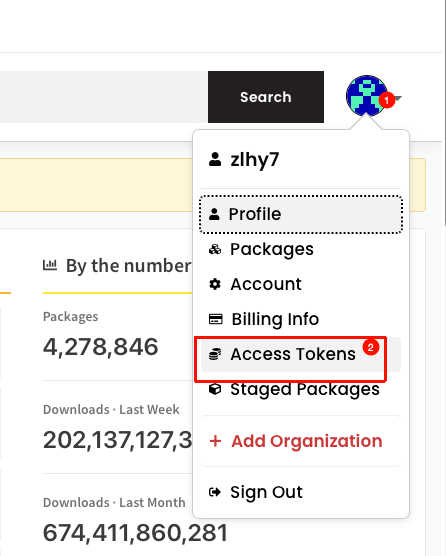 点击
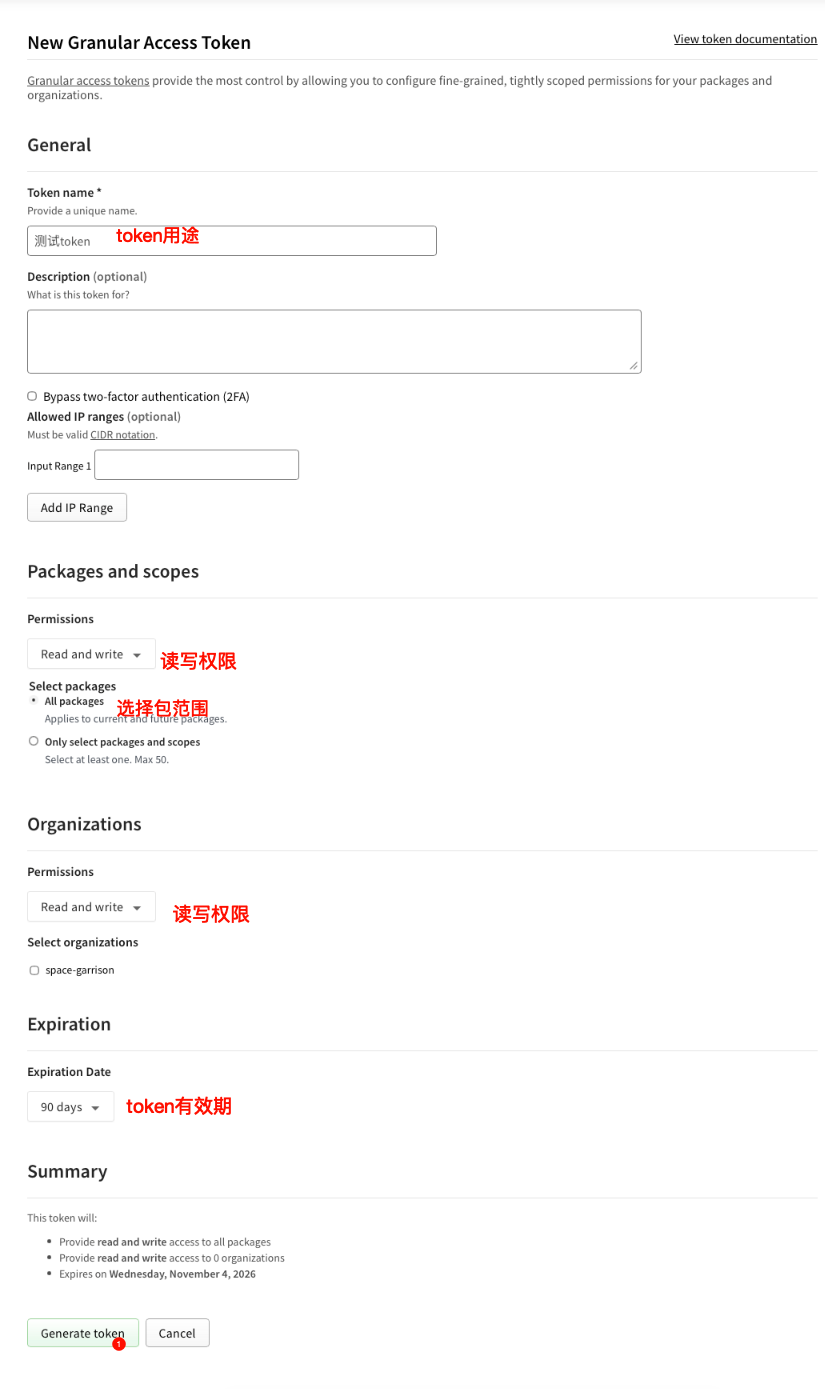
点击Generate New Token按钮 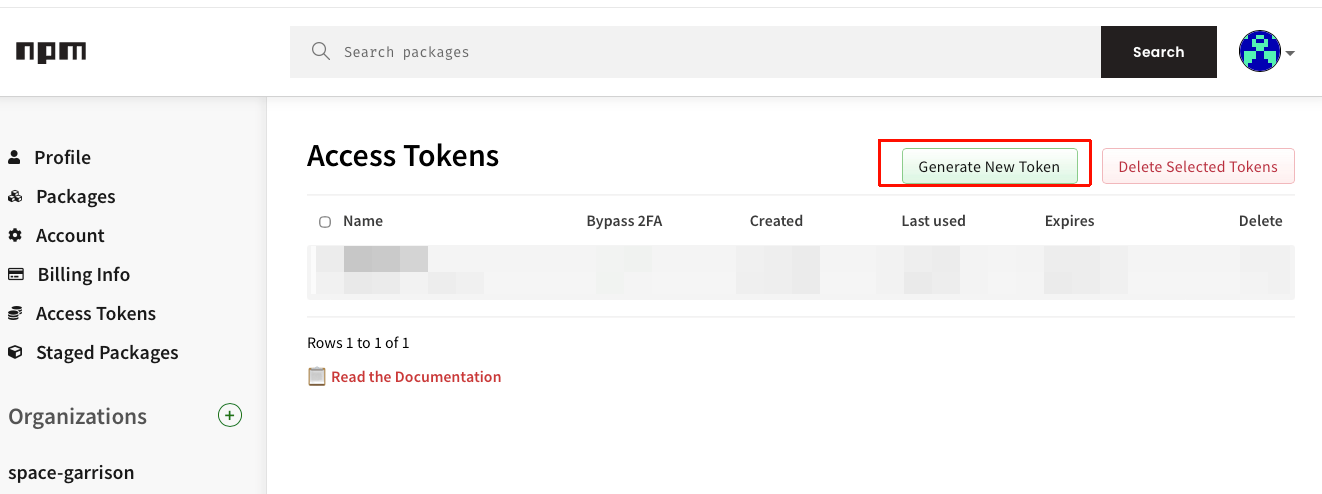 填写token名称,权限,过期时间
  复制token,保存到本地,方便后面使用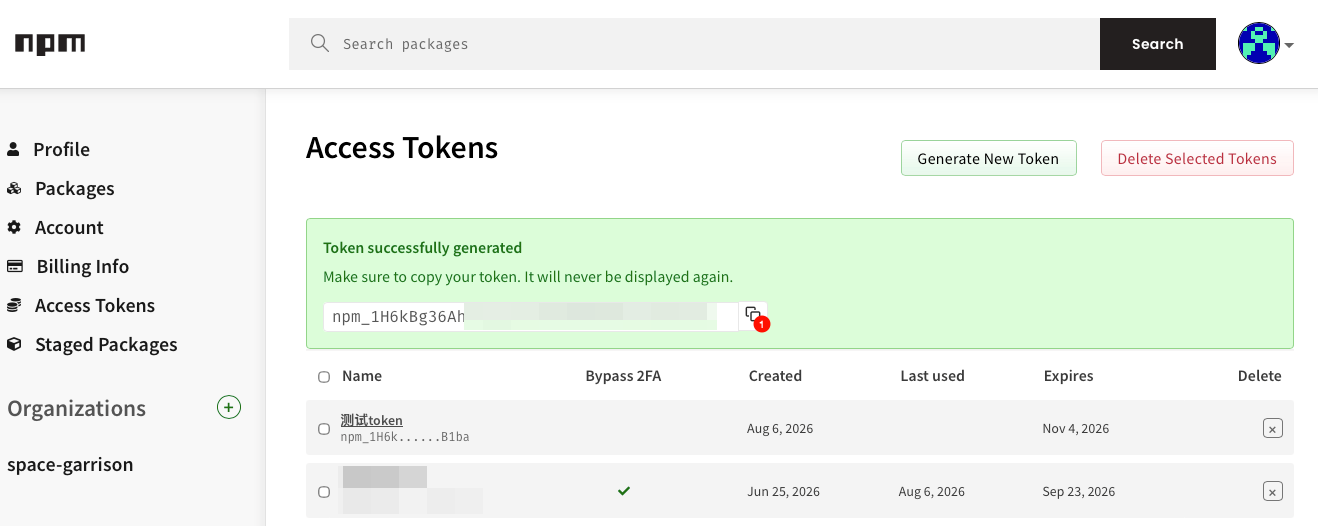
3.本地代码添加推送配置
- package.json,添加如下配置
json
{
  "name": "@your-username/your-package-name",
  "version": "1.0.3",
  "description": "npm包描述",
  "main": "index.js",
  "keywords": [
    "关键字"
  ],
  "author": "zlhy7",
  "license": "MIT",
  "publishConfig": {
    "registry": "https://registry.npmjs.org",
    "access": "public"
  },
  "scripts": {
    "publish:npm": "node scripts/publish-npm.js"
  }
}| 字段 | 说明 |
|---|---|
| name | 包名 |
| version | 版本号 |
| description | 包描述 |
| main | 主文件 |
| keywords | 关键字 |
| author | 作者 |
| license | 许可证 |
| publishConfig | 发布配置 |
| scripts[publish:npm] | 发布脚本 |
- .npmrc,新建文件
_authToken就是上面创建的access token
# 发布包强制走官方npmjs源
registry=https://registry.npmjs.org
# 绑定你的自动化Token,仅本项目生效
//registry.npmjs.org/:_authToken=npm_xxxxxxx- .npmignore,新建文件
.npmignore
# 开发文件
node_modules/
nodemon.json
.git/
.gitignore

# 构建产物
dist/
*.exe

# 临时文件
uploads/
decrypted/
*.tmp
*.log

# IDE配置
.vscode/
.idea/
*.swp
*.swo

# 测试文件
test/
tests/
*.test.js
*.spec.js

# 文档(npm会自动包含README.md和LICENSE)
docs/
*.md
!README.md
!LICENSE

# 其他
.DS_Store
Thumbs.db- scripts/publish-npm.js,新建文件
scripts/publish-npm.js
js
#!/usr/bin/env node

/**
 * 跨平台发布脚本:将当前包推送到 npm 仓库(publishConfig / .npmrc 配置的源)
 * 支持 Windows / macOS / Linux
 *
 * 用法:npm run publish:npm
 */

const { execSync } = require('child_process');
const fs = require('fs');
const path = require('path');

const ROOT = path.resolve(__dirname, '..');
const PKG_PATH = path.join(ROOT, 'package.json');
const NPMRC_PATH = path.join(ROOT, '.npmrc');

/**
 * 执行命令并实时输出
 * @param {string} command - shell 命令
 */
function run(command) {
  console.log(`\n> ${command}\n`);
  execSync(command, {
    cwd: ROOT,
    stdio: 'inherit',
    env: process.env,
    shell: true
  });
}

/**
 * 校验 .npmrc 中是否配置了可用的 authToken
 * @returns {boolean}
 */
function hasAuthToken() {
  if (!fs.existsSync(NPMRC_PATH)) {
    return false;
  }
  const content = fs.readFileSync(NPMRC_PATH, 'utf8');
  // 占位符 xxx / 空 token 视为未配置
  const match = content.match(/:_authToken=(.+)/);
  if (!match) {
    return false;
  }
  const token = match[1].trim();
  return token.length > 0 && token !== 'xxx' && !token.startsWith('你的');
}

function main() {
  const pkg = JSON.parse(fs.readFileSync(PKG_PATH, 'utf8'));
  const registry = (pkg.publishConfig && pkg.publishConfig.registry) || 'https://registry.npmjs.org';
  // 支持:npm run publish:npm -- --dry-run(只预览,不真正上传)
  const dryRun = process.argv.includes('--dry-run');

  console.log('===========================================');
  console.log(dryRun ? '  发布到 npm(dry-run 预览)' : '  发布到 npm');
  console.log('===========================================');
  console.log(`包名: ${pkg.name}`);
  console.log(`版本: ${pkg.version}`);
  console.log(`仓库: ${registry}`);
  console.log('');

  if (!hasAuthToken()) {
    console.error('错误: 未检测到有效的 npm authToken。');
    console.error('请编辑项目根目录 .npmrc,将 _authToken 替换为真实 Token。');
    console.error('详细步骤见: NPM发布笔记.md');
    process.exit(1);
  }

  // 发布前做一次打包预览,确认将上传的文件列表
  run('npm pack --dry-run');

  if (dryRun) {
    // 再走一遍 npm 官方 dry-run,验证鉴权与元数据,但不上传
    run(`npm publish --dry-run --registry ${registry}`);
    console.log('');
    console.log('dry-run 通过。去掉 --dry-run 即可真正发布。');
    console.log('');
    return;
  }

  // 按 publishConfig 指定源发布;scoped 包需 access=public 才能外网全局安装
  run(`npm publish --registry ${registry}`);

  console.log('');
  console.log('===========================================');
  console.log('  发布成功');
  console.log('===========================================');
  console.log('');
  console.log('外网全局安装:');
  console.log(`  npm install -g ${pkg.name}`);
  console.log('');
}

try {
  main();
} catch (error) {
  console.error('');
  console.error('发布失败:', error.message || error);
  process.exit(1);
}4.本地代码推送
shell
npm run publish:npm5.发布后验证
shell
npm view @your-username/your-package-name
# 例如:npm view @zlhy7/ld-decrypt-tool