Appearance
随记
多动手,多总结。
最近我碰到这样一个业务常见,某个第三方服务平台需要填写一个回调地址进行数据推送,但是只能配置一个地址,如果其他环境想用应该怎么办呢


一番搜索过后我找到两个解决方案,
- nginx流量复制
这个后期有空实验记录下 - spring boot实现超轻量级网关(反向代理、转发)
本文采用这个
参考文档
1. 准备一个springboot工程
2. 引入依赖
以下依赖有些是辅助开发的
xml
<dependency>
    <groupId>org.springframework.boot</groupId>
    <artifactId>spring-boot-starter-web</artifactId>
</dependency>

<dependency>
    <groupId>org.springframework.boot</groupId>
    <artifactId>spring-boot-starter-test</artifactId>
    <scope>test</scope>
</dependency>

<dependency>
    <groupId>com.alibaba.fastjson2</groupId>
    <artifactId>fastjson2</artifactId>
    <version>2.0.31</version>
</dependency>
<dependency>
    <groupId>org.projectlombok</groupId>
    <artifactId>lombok</artifactId>
</dependency>
<!-- 文件io流工具类 -->
<dependency>
    <groupId>commons-io</groupId>
    <artifactId>commons-io</artifactId>
    <version>2.11.0</version>
</dependency>
<!-- 文件上传 -->
<dependency>
    <groupId>commons-fileupload</groupId>
    <artifactId>commons-fileupload</artifactId>
    <version>1.5</version>
</dependency>
<!-- restTemplate免ssl校验用 -->
<dependency>
    <groupId>org.apache.httpcomponents</groupId>
    <artifactId>httpclient</artifactId>
</dependency>3. 配置springboot配置文件
- application.yml
yml
spring:
  profiles:
active: pro细节配置根据项目实际来,这里仅配置端口号,说明示例即可
- application-dev.yml
yml
server:
port: 38080- application-test.yml
yml
server:
port: 28080- application-pro.yml
yml
server:
port: 18080目录结构如下
shell
    ├── pom.xml
    ├── springboot27.iml
    ├── src
    │   ├── main
    │   │   ├── java
    │   │   │   └── top
    │   │   │       └── zlhy7
    │   │   │           ├── Application.java
    │   │   │           ├── config
    │   │   │           │   ├── HttpServletRequestInputStreamFilter.java   # 可重复读取请求body用
    │   │   │           │   ├── InputStreamHttpServletRequestWrapper.java  # 可重复读取请求body用
    │   │   │           │   └── RestTemplateConfig.java  # 转发请求用的http客户端
    │   │   │           ├── controller
    │   │   │           │   ├── ForwardController.java  # 请求转发到
    │   │   │           │   └── TestController.java     # 测试请求转发
    │   │   │           └── service
    │   │   │               └── RoutingDelegate.java
    │   │   └── resources
    │   │       ├── application-dev.yml     # 开发环境配置
    │   │       ├── application-pro.yml     # 生产环境配置
    │   │       ├── application-test.yml    # 测试环境配置
│ │ ├── application.yml # 默认配置4. springboot-可重复读取请求body
5. 添加RestTemplate配置类
java
package top.zlhy7.config;

import org.apache.http.config.Registry;
import org.apache.http.config.RegistryBuilder;
import org.apache.http.conn.socket.ConnectionSocketFactory;
import org.apache.http.conn.socket.PlainConnectionSocketFactory;
import org.apache.http.conn.ssl.NoopHostnameVerifier;
import org.apache.http.conn.ssl.SSLConnectionSocketFactory;
import org.apache.http.impl.client.CloseableHttpClient;
import org.apache.http.impl.client.HttpClients;
import org.apache.http.impl.conn.PoolingHttpClientConnectionManager;
import org.apache.http.ssl.SSLContextBuilder;
import org.springframework.context.annotation.Bean;
import org.springframework.context.annotation.Configuration;
import org.springframework.http.client.HttpComponentsClientHttpRequestFactory;
import org.springframework.web.client.RestTemplate;

import java.security.KeyManagementException;
import java.security.KeyStoreException;
import java.security.NoSuchAlgorithmException;
import java.security.cert.X509Certificate;

/**
 * @author shafulin
 * @date 2023/5/12 02:03
 * @description RestTemplate 配置类
 * 参考文档:https://blog.csdn.net/weixin_40910372/article/details/100144055
 */
@Configuration
public class RestTemplateConfig {
    @Bean
    public RestTemplate restTemplate() throws KeyManagementException, NoSuchAlgorithmException, KeyStoreException {
        int minutes_5 = 5 * 60 * 1000;
        HttpComponentsClientHttpRequestFactory factory = new
                HttpComponentsClientHttpRequestFactory();
        factory.setConnectionRequestTimeout(minutes_5);
        factory.setConnectTimeout(minutes_5);
        factory.setReadTimeout(minutes_5);
        // https
        SSLContextBuilder builder = new SSLContextBuilder();
        builder.loadTrustMaterial(null, (X509Certificate[] x509Certificates, String s) -> true);
        SSLConnectionSocketFactory socketFactory = new SSLConnectionSocketFactory(builder.build(), new String[]{"SSLv2Hello", "SSLv3", "TLSv1", "TLSv1.2"}, null, NoopHostnameVerifier.INSTANCE);
        Registry<ConnectionSocketFactory> registry = RegistryBuilder.<ConnectionSocketFactory>create()
                .register("http", new PlainConnectionSocketFactory())
                .register("https", socketFactory).build();
        PoolingHttpClientConnectionManager phccm = new PoolingHttpClientConnectionManager(registry);
        phccm.setMaxTotal(200);
        CloseableHttpClient httpClient = HttpClients.custom()
                .setSSLSocketFactory(socketFactory)
                .setConnectionManager(phccm)
                .setConnectionManagerShared(true)
                .build();
        factory.setHttpClient(httpClient);
        return new RestTemplate(factory);
    }
}6. 添加请求转发Service
java
package top.zlhy7.service;

import lombok.RequiredArgsConstructor;
import lombok.extern.slf4j.Slf4j;
import org.apache.commons.io.FileUtils;
import org.apache.commons.io.IOUtils;
import org.springframework.core.io.FileSystemResource;
import org.springframework.http.HttpHeaders;
import org.springframework.http.HttpMethod;
import org.springframework.http.HttpStatus;
import org.springframework.http.MediaType;
import org.springframework.http.RequestEntity;
import org.springframework.http.ResponseEntity;
import org.springframework.stereotype.Service;
import org.springframework.util.CollectionUtils;
import org.springframework.util.LinkedMultiValueMap;
import org.springframework.util.MultiValueMap;
import org.springframework.web.client.RestTemplate;
import org.springframework.web.multipart.MultipartFile;
import org.springframework.web.multipart.MultipartHttpServletRequest;
import org.springframework.web.multipart.MultipartResolver;
import org.springframework.web.multipart.commons.CommonsMultipartResolver;

import javax.servlet.http.HttpServletRequest;
import javax.servlet.http.HttpServletResponse;
import java.io.File;
import java.io.IOException;
import java.net.URI;
import java.net.URISyntaxException;
import java.util.Collections;
import java.util.List;
import java.util.Map;
import java.util.Set;

/**
 * @author shafulin
 * @date 2023/5/11 23:47
 * @description
 */
@RequiredArgsConstructor
@Slf4j
@Service
public class RoutingDelegate {
    /**
     * http调用
     */
    private final RestTemplate restTemplate;

    /**
     * 重定向请求
     * @param request 源请求
     * @param response 源响应
     * @param routeUrl 目标路由,注意这个末尾要跟上"/"
     * @param prefix 源路由替换地址
     * @return
     */
    public ResponseEntity<String> redirect(HttpServletRequest request, HttpServletResponse response, String routeUrl, String prefix) {
        try {
            // 获取转发到url
            String redirectUrl = createRedictUrl(request,routeUrl, prefix);
            log.info("请求转发-转发地址为:{}",redirectUrl);
            // 构建请求
            RequestEntity requestEntity = createRequestEntity(request, redirectUrl);
            // 发送请求
            return restTemplate.exchange(requestEntity, String.class);
        } catch (Exception e) {
            return new ResponseEntity("转发失败", HttpStatus.INTERNAL_SERVER_ERROR);
        }
    }

    private String createRedictUrl(HttpServletRequest request, String routeUrl, String prefix) {
        String queryString = request.getQueryString();
        return routeUrl + request.getRequestURI().replace(prefix, "") +
                (queryString != null ? "?" + queryString : "");
    }

    /**
     * 构建请求体
     * @param request 被转发的请求对象
     * @param url 要转发到的url
     * @return
     * @throws URISyntaxException
     * @throws IOException
     */
    private RequestEntity createRequestEntity(HttpServletRequest request, String url) throws URISyntaxException, IOException {
        // 获取query参数/application/x-www-form-urlencoded 参数
        Map<String, String[]> parameterMap = request.getParameterMap();
        // 设置请求类型
        HttpMethod httpMethod = HttpMethod.resolve(request.getMethod());
        MultiValueMap<String, String> headers = parseRequestHeader(request);
        // 情况1:json传参,读取请求body
        Object body = IOUtils.toByteArray(request.getInputStream());
        // 情况2:application/x-www-form-urlencoded 表单传参
        if (MediaType.APPLICATION_FORM_URLENCODED_VALUE.equals(request.getContentType())) {
            headers.add(HttpHeaders.CONTENT_TYPE, MediaType.APPLICATION_FORM_URLENCODED_VALUE);
            log.info("请求转发- application/x-www-form-urlencoded表单请求");
            MultiValueMap<Object, Object> params = new LinkedMultiValueMap<>();
            Set<Map.Entry<String, String[]>> entrySet = parameterMap.entrySet();
            for(Map.Entry<String, String[]> entry : entrySet){
                params.add(entry.getKey(),entry.getValue()[0]);
            }
            body = params;
        }
        // 情况3:multipart/form-data; 文件上传+额外属性
        if (request.getContentType().startsWith(MediaType.MULTIPART_FORM_DATA_VALUE)) {
            headers.add(HttpHeaders.CONTENT_TYPE, MediaType.MULTIPART_FORM_DATA_VALUE);
            log.info("请求转发- multipart/form-data表单请求");
            MultiValueMap<Object, Object> params = new LinkedMultiValueMap<>();
            Set<Map.Entry<String, String[]>> entrySet = parameterMap.entrySet();
            //region 处理基本属性
            for(Map.Entry<String, String[]> entry : entrySet){
                params.add(entry.getKey(),entry.getValue()[0]);
            }
            //endregion
            // 处理文件属性,参考文档:https://www.cnblogs.com/sanrenblog/p/15648871.html
            //下面这句必须加,不然报错
            MultipartResolver resolver = new CommonsMultipartResolver(request.getSession().getServletContext());
            MultipartHttpServletRequest multipartRequest = (MultipartHttpServletRequest) request;
            //获取上传上来的文件
            Set<Map.Entry<String, List<MultipartFile>>> multipartFileEntrySet = multipartRequest.getMultiFileMap().entrySet();
            if(!CollectionUtils.isEmpty(multipartFileEntrySet)){
                log.info("请求转发-封装文件属性");
                for (Map.Entry<String, List<MultipartFile>> entry : multipartFileEntrySet) {
                    for (MultipartFile multipartFile : entry.getValue()) {
                        File file = new File(multipartFile.getOriginalFilename());
                        try {
                            FileUtils.copyInputStreamToFile(multipartFile.getInputStream(), file);
                        } catch (IOException e) {
                            continue;
                        }
                        FileSystemResource fileSystemResource = new FileSystemResource(file.getPath());
                        params.add(entry.getKey(),fileSystemResource);
                    }
                }
            }
            body = params;
        }
        return new RequestEntity<>(body, headers, httpMethod, new URI(url));
    }

    /**
     * 构建请求头
     * @param request
     * @return
     */
    private MultiValueMap<String, String> parseRequestHeader(HttpServletRequest request) {
        HttpHeaders headers = new HttpHeaders();
        List<String> headerNames = Collections.list(request.getHeaderNames());
        for (String headerName : headerNames) {
            List<String> headerValues = Collections.list(request.getHeaders(headerName));
            for (String headerValue : headerValues) {
                headers.add(headerName, headerValue);
            }
        }
        return headers;
    }
}7. 添加测试控制器
- TestController
测试转发的接口
java
package top.zlhy7.controller;

import lombok.RequiredArgsConstructor;
import lombok.extern.slf4j.Slf4j;
import org.springframework.beans.factory.annotation.Value;
import org.springframework.http.ResponseEntity;
import org.springframework.web.bind.annotation.RequestMapping;
import org.springframework.web.bind.annotation.RestController;
import top.zlhy7.service.RoutingDelegate;

import javax.servlet.http.HttpServletRequest;
import javax.servlet.http.HttpServletResponse;

/**
 * @author 沙福林
 * @date 2023/5/12 01:24
 * @description 测试控制器
 *
 * 本控制器模拟,例如某第三方平台回调地址,只会回调线上一个服务地址,我们需要手动将服务请求转发
 * 例如:微信公众号回调线上pro环境某个地址 http://xxxx/callback/xxx,将该请求给 dev,test 也转发下
 */
@Slf4j
@RequiredArgsConstructor
@RequestMapping("test")
@RestController
public class TestController {
    /**
     * 请求转发
     */
    private final RoutingDelegate routingDelegate;
    /**
     * 当前环境
     */
    @Value("${spring.profiles.active:dev}")
    private String profile;
    /**
     * 转发请求
     * @param request http请求
     * @param response http响应
     * @return
     * @author 沙福林 on 2023/5/12 01:24
     */
    @RequestMapping("callback/**")
    public ResponseEntity callback(HttpServletRequest request,HttpServletResponse response){
        log.info("转发请求-自己业务处理………………");
        // 仅在pro环境做请求转发
        if(!"pro".equals(profile)){
            return ResponseEntity.ok().build();
        }
        // 请求转发
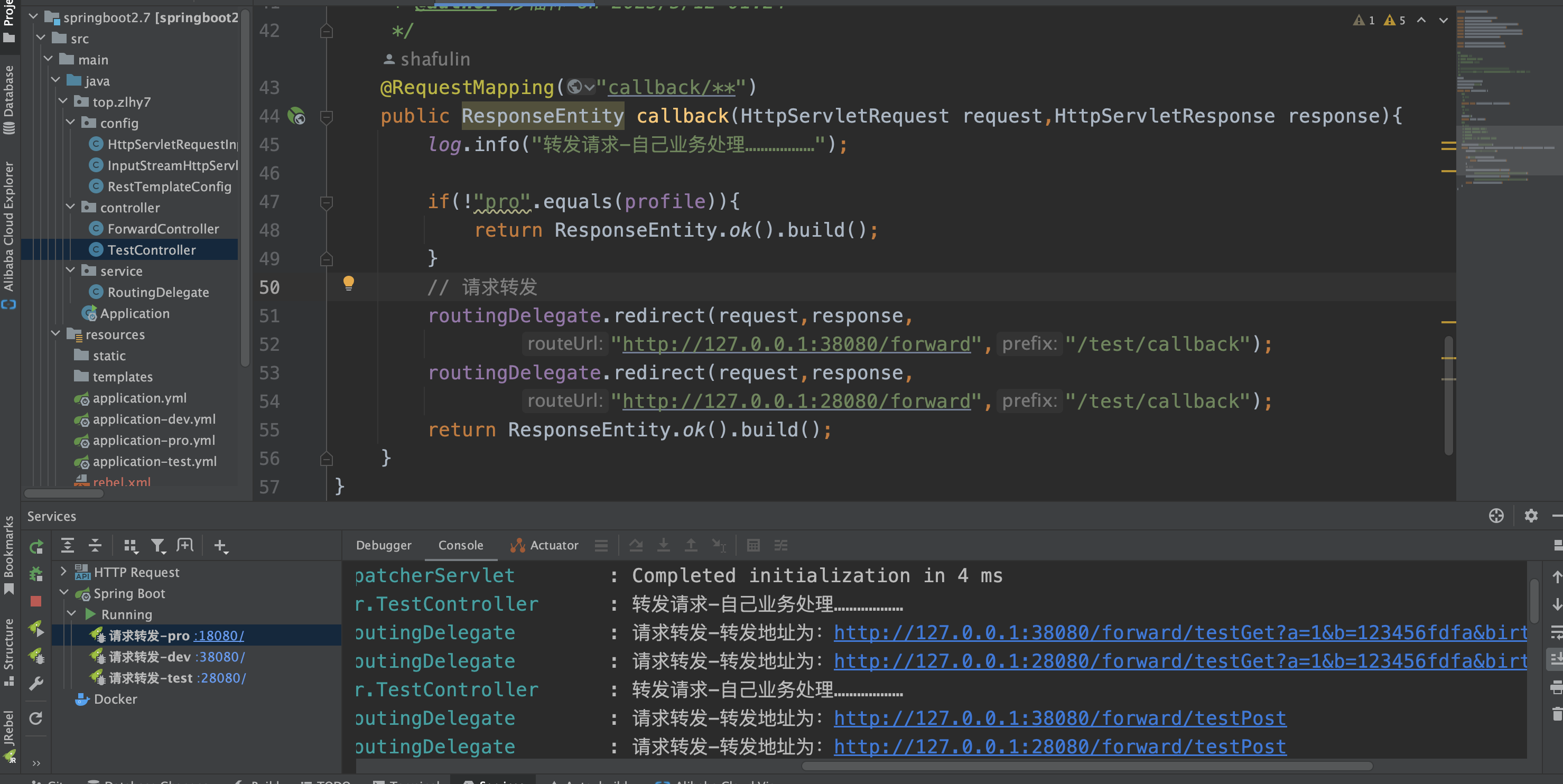
        routingDelegate.redirect(request,response,
                "http://127.0.0.1:38080/forward","/test/callback");
        routingDelegate.redirect(request,response,
                "http://127.0.0.1:28080/forward","/test/callback");
        return ResponseEntity.ok().build();
    }
}- ForwardController
java
package top.zlhy7.controller;

import com.alibaba.fastjson2.JSONObject;
import lombok.extern.slf4j.Slf4j;
import org.springframework.beans.factory.annotation.Value;
import org.springframework.http.HttpStatus;
import org.springframework.http.ResponseEntity;
import org.springframework.util.MultiValueMap;
import org.springframework.web.bind.annotation.GetMapping;
import org.springframework.web.bind.annotation.PostMapping;
import org.springframework.web.bind.annotation.RequestBody;
import org.springframework.web.bind.annotation.RequestMapping;
import org.springframework.web.bind.annotation.RequestParam;
import org.springframework.web.bind.annotation.RestController;
import org.springframework.web.multipart.MultipartFile;
import org.springframework.web.multipart.MultipartHttpServletRequest;

import javax.servlet.http.HttpServletRequest;
import java.util.Map;

/**
 * @author shafulin
 * @date 2023/5/11 23:36
 * @description 转发后的请求
 */
@Slf4j
@RequestMapping("forward")
@RestController
public class ForwardController {
    /**
     * 当前环境
     */
    @Value("${spring.profiles.active:dev}")
    private String profile;

    /**
     * 测试get请求
     * @param params 参数
     * @return
     */
    @GetMapping("testGet")
    public ResponseEntity testGet(@RequestParam Map<String,Object> params){
        log.info("测试GET请求-环境:{},参数值:{}",profile,params);
        return ResponseEntity.ok().body(params);
    }
    /**
     * 测试post请求
     * @param jsonObject 参数
     * @return
     */
    @PostMapping("testPost")
    public ResponseEntity testPost(@RequestBody JSONObject jsonObject){
        log.info("测试POST请求-环境:{},参数值:{}",profile,jsonObject.toJSONString());
        return new ResponseEntity(HttpStatus.OK);
    }
    /**
     * 测试post表单请求
     * @param params 参数
     * @return
     */
    @PostMapping("testPostForm")
    public ResponseEntity testPostForm(@RequestParam Map<String, Object> params){
        log.info("测试POST表单请求-环境:{},参数值:{}",profile,params);
        return new ResponseEntity(HttpStatus.OK);
    }
    /**
     * 测试post表单文件请求
     * @param file 文件
     * @param name 额外属性
     * @return
     */
    @PostMapping("testPostFormFile")
    public ResponseEntity testPostFormFile(MultipartFile[] file,MultipartFile zipFile,String name, HttpServletRequest request){
        MultipartHttpServletRequest multipartRequest = (MultipartHttpServletRequest) request;
        //获取上传上来的文件
        MultiValueMap<String, MultipartFile> multiFileMap = multipartRequest.getMultiFileMap();
        log.info("测试POST表单文件请求-环境:{},文件名:{},额外属性:{}",multiFileMap,name);
        return new ResponseEntity(HttpStatus.OK);
    }
}- 复制idea启动配置,模拟请求转发
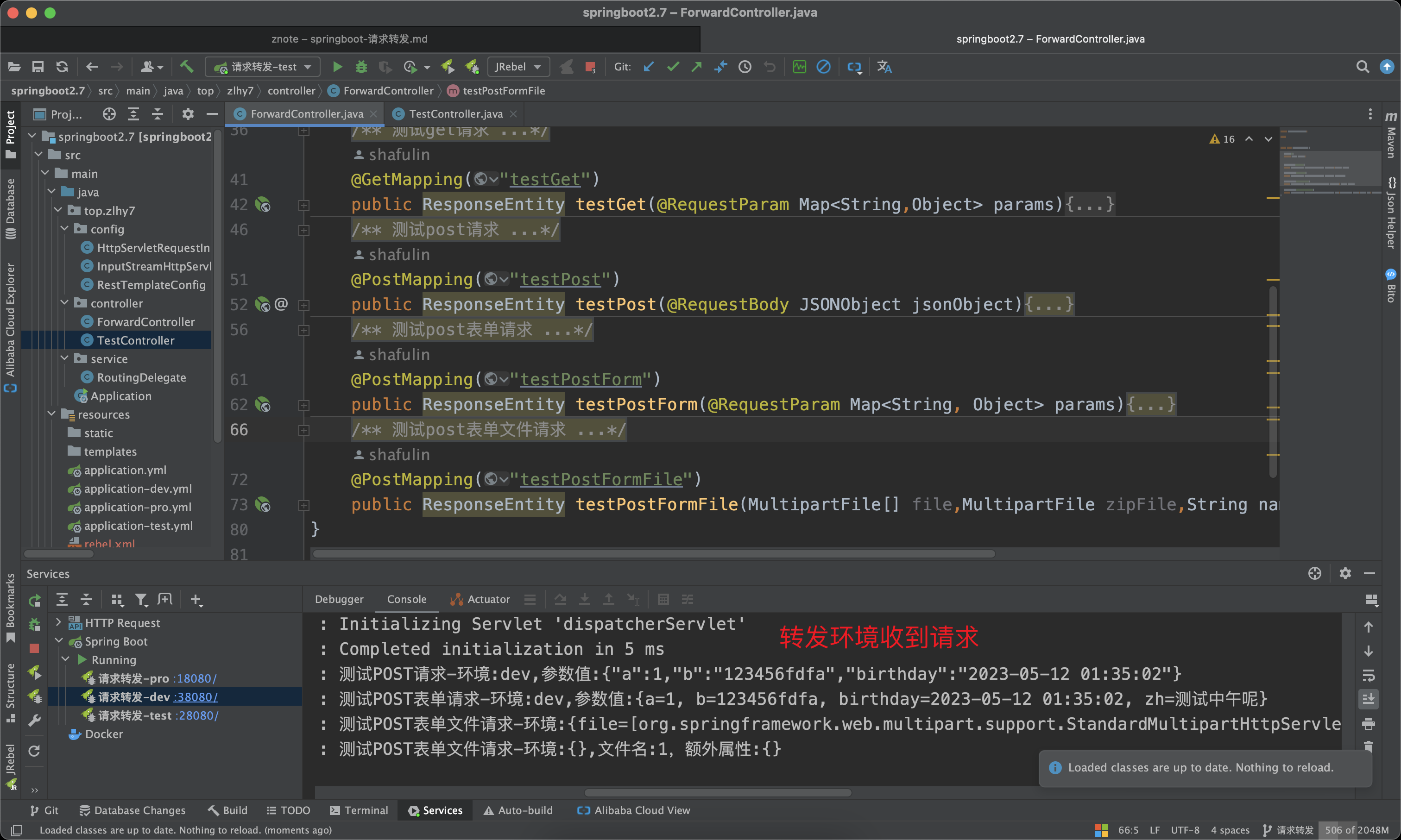
将pro环境的 http:127.0.0.1/test/callback/**请求,转发到dev,test 的 /forward/***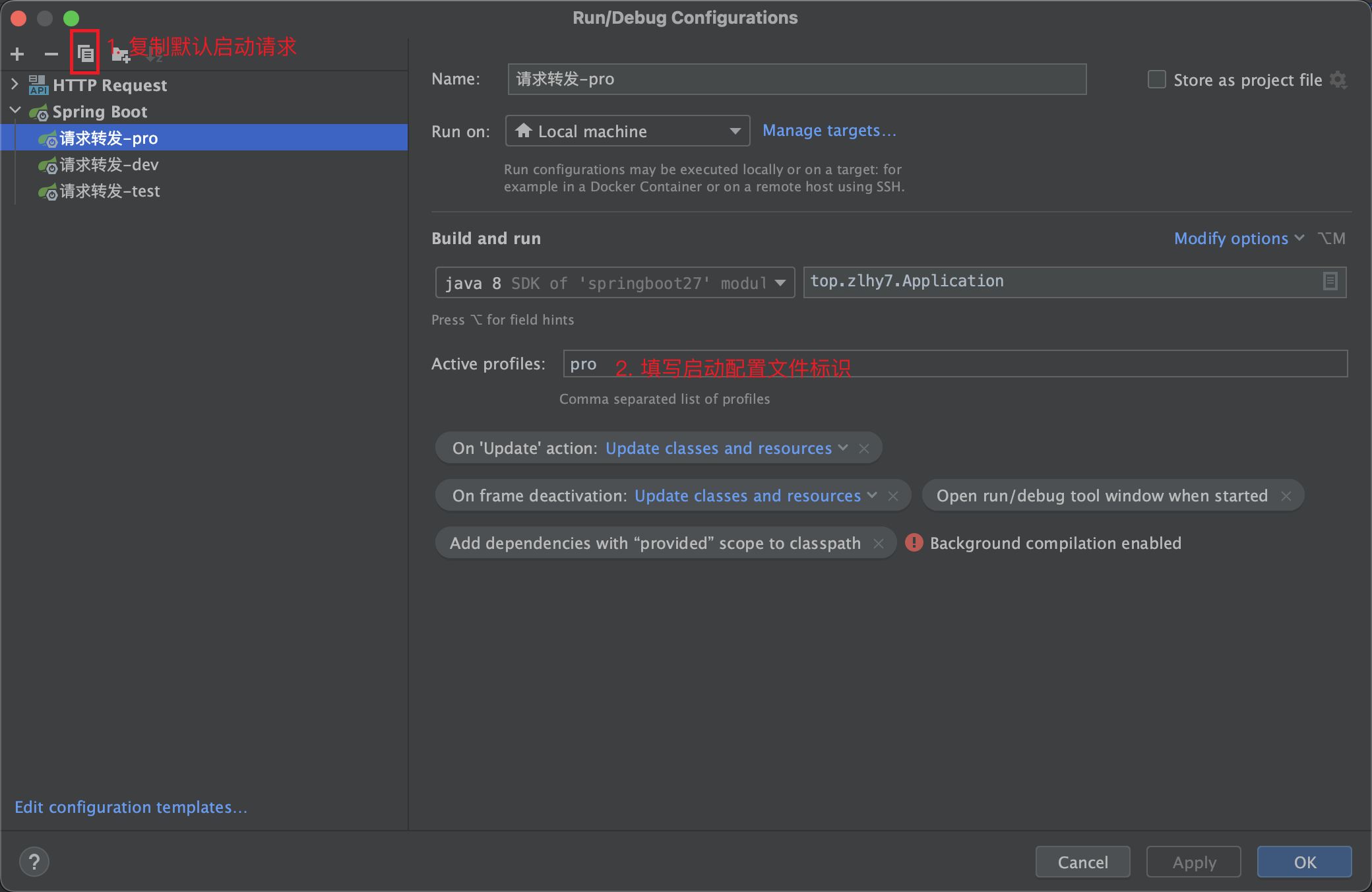
- 测试GET请求
shell
curl --location --request GET 'http://127.0.0.1:18080/test/callback/testGet?a=1&b=123456fdfa&birthday=2023-05-12 01:35:02' \
--header 'User-Agent: Apifox/1.0.0 (https://www.apifox.cn)'- 测试POST请求,JSON参数
shell
curl --location --request POST 'http://127.0.0.1:18080/test/callback/testPost' \
--header 'User-Agent: Apifox/1.0.0 (https://www.apifox.cn)' \
--header 'Content-Type: application/json' \
--data '{
    "a": 1,
    "b": "123456fdfa",
    "birthday": "2023-05-12 01:35:02"
}'- 测试POST表单请求,
x-www-form-urlencoded
shell
curl --location --request POST 'http://127.0.0.1:18080/test/callback/testPostForm' \
--header 'User-Agent: Apifox/1.0.0 (https://www.apifox.cn)' \
--data-urlencode 'a=1' \
--data-urlencode 'b=123456fdfa' \
--data-urlencode 'birthday=2023-05-12 01:35:02' \
--data-urlencode 'zh=测试中午呢'- 测试POST表单请求,
multipart/form-data;
shell
curl --location --request POST 'http://127.0.0.1:18080/test/callback/testPostFormFile' \
--header 'User-Agent: Apifox/1.0.0 (https://www.apifox.cn)' \
--form 'name="1"' \
--form 'file=@"/Users/xxx/Downloads/zuofei3的副本.png"' \
--form 'file=@"/Users/xxx/Downloads/调用摄像头.html"' \
--form 'zipFile=@"/Users/xxx/Pictures/yanjing.jpg"'