
Appearance
随记
积丝成寸,积寸成尺;寸尺水已,遂成丈匹。
windows服务器,命令行没有类似linux的nohup命令,默认部署springboot应用时,终端窗口不能关闭且有时因为中断设置问题,springboot服务会中断。
有一次听说了WinSW,将springboot服务打包成windows服务,实验一番后部署,确实有趣,特记录下


参考文档
使用winsw将springboot jar以windows服务的方式运行
1. 下载 WinSW相关
代直WinSW-x64.exe下载这个代直sample-minimal.xml下载这个- releases |
代releases
2. 服务安装准备
2.1 将springboot工程打包
打包为 xxx.jar,本文将项目打包为
test-project.jar
2.2 整理服务文件
将 test-project.jar,WinSW-x64.exe,sample-minimal.xml 新建目录以服务名命名,将3个文件放置在一起,目录结构如下
shell
- test-project(服务名称的目录)
    - test-project.jar(后端jar包)
    - WinSW-x64.exe
- sample-minimal.xml将 WinSW-x64.exe,sample-minimal.xml 文件分别命名为项目同名,如 test-project.exe,test-project.xml,修改后目录结构如下
shell
- test-project(服务名称的目录)
    - test-project.jar(后端jar包)
    - test-project.exe
    - test-project.xml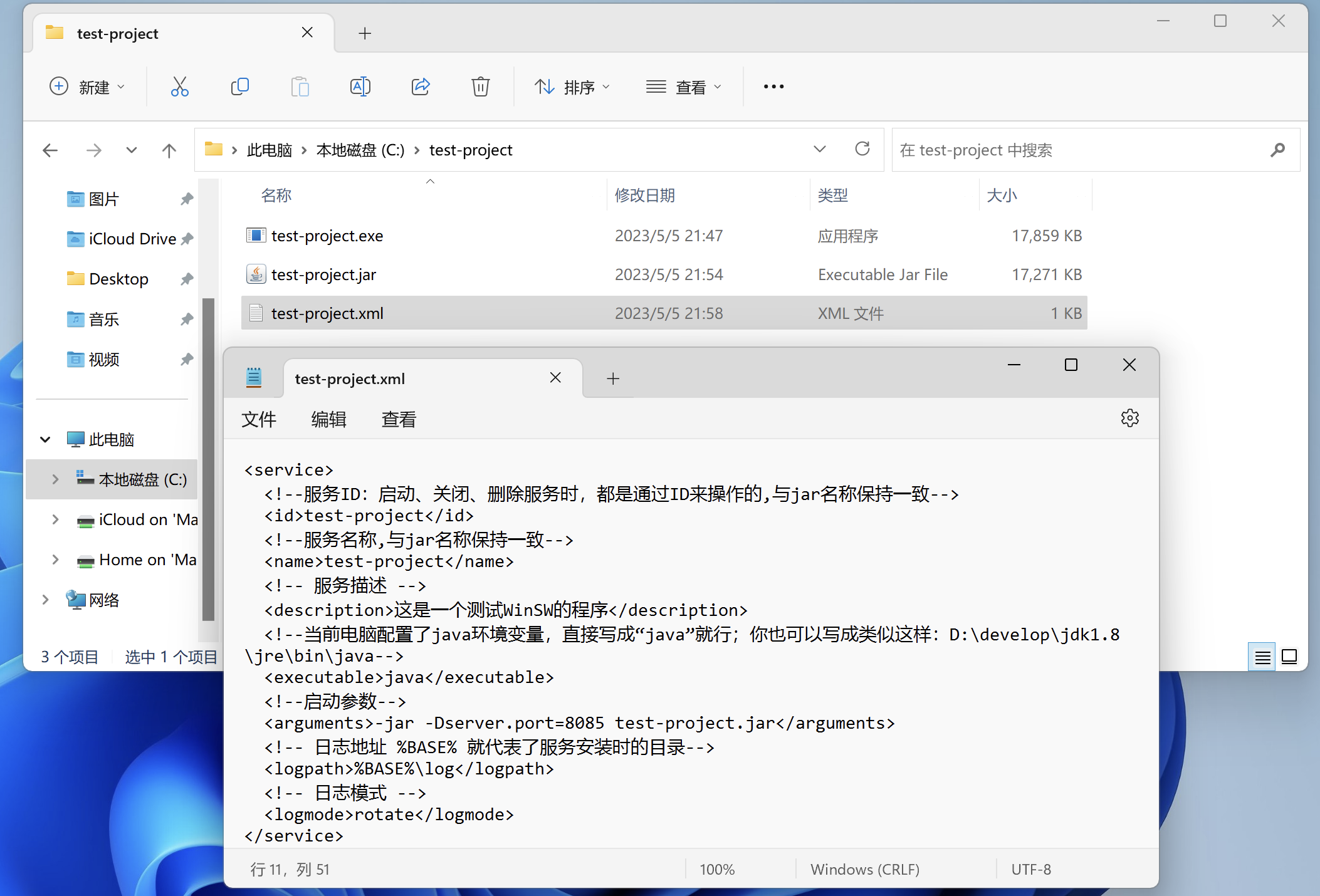
2.3 修改test-project.xml文件内容如下,具体参数根据自己部署情况修改
xml
<service>
  <!--服务ID:启动、关闭、删除服务时,都是通过ID来操作的,与jar名称保持一致-->
  <id>test-project</id>
  <!--服务名称,与jar名称保持一致-->
  <name>test-project</name>
  <!-- 服务描述 -->
  <description>这是一个测试WinSW的程序</description>
  <!--当前电脑配置了java环境变量,直接写成“java”就行;你也可以写成类似这样:D:\develop\jdk1.8\jre\bin\java-->
  <executable>java</executable>
  <!--启动参数-->
  <arguments>-jar -Dserver.port=8085 test-project.jar</arguments>
  <!-- 日志地址 %BASE% 就代表了服务安装时的目录-->
  <logpath>%BASE%\log</logpath>
  <!-- 日志模式 -->
  <logmode>rotate</logmode>
</service>2.4 配置服务
使用 管理员命令提示符,管理员命令提示符,管理员命令提示符 !!! 不然会报没有权限
shell
echo 安装服务
test-project.exe install

echo 启动服务
net start test-project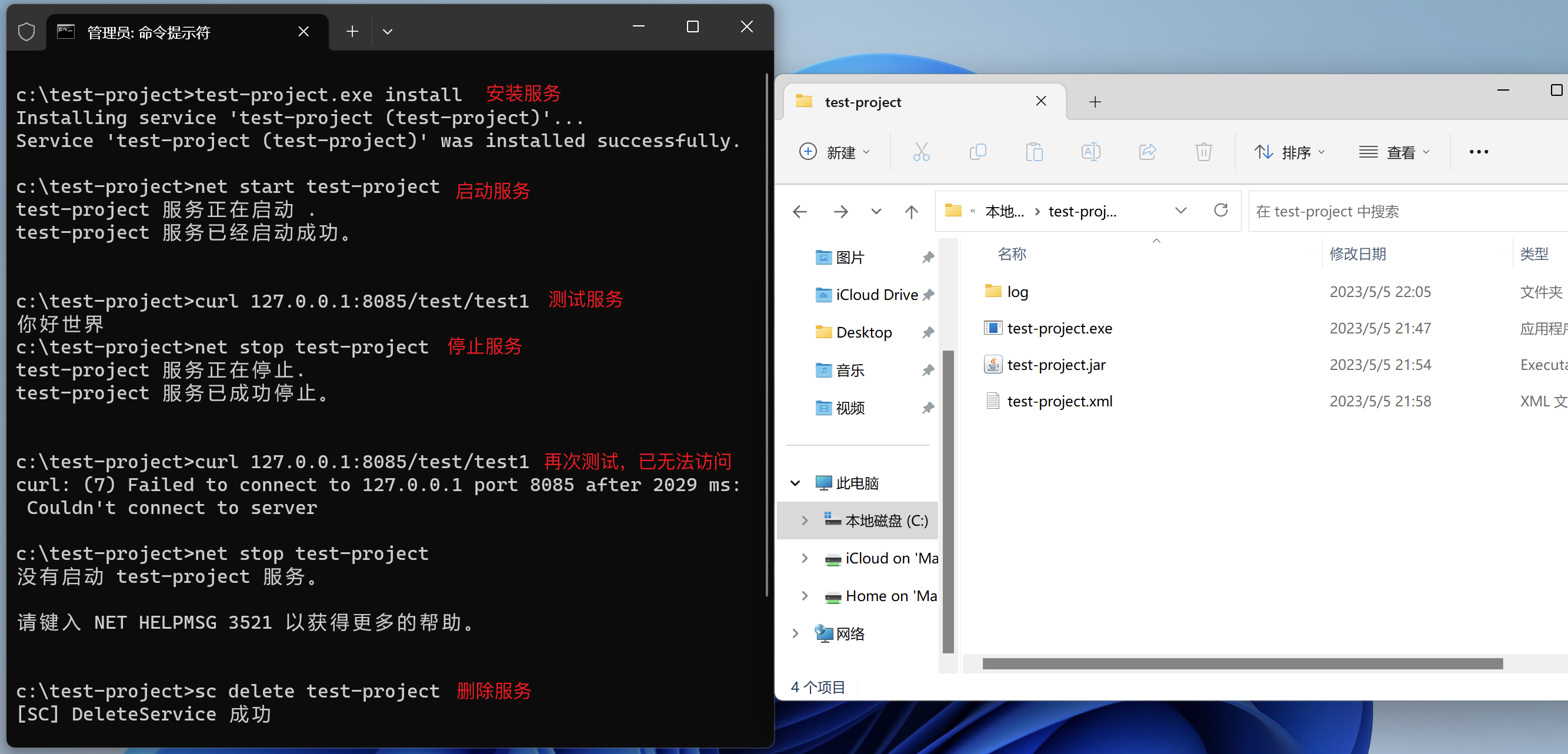 其他常用命令
- 删除服务
shell
sc delete test-project- 更新jar,重新注册服务,即先删后加
shell
sc delete test-project
test-project.exe install- 启用服务
shell
net start test-project- 停用服务
shell
net stop test-project3. 验证
简单写了个控制器,测试请求正常即可
java
package top.zlhy7.controller;

import org.springframework.web.bind.annotation.GetMapping;
import org.springframework.web.bind.annotation.RequestMapping;
import org.springframework.web.bind.annotation.RestController;

/**
 * @author 沙福林
 * @date 2023/5/5 21:53
 * @description 测试控制器
 */
@RequestMapping("test")
@RestController
public class TestController {
    @GetMapping("test1")
    public String test1(){
        return "你好世界";
    }
}访问自己服务的地址,例如我这里 http://127.0.0.1:8085/test/test1