
Appearance
AI相关
OpenClaw
简介
开源个人 AI 助手:本地跑 Gateway,对接飞书 / Discord / Telegram 等消息渠道,可装 Skills 执行任务。自备大模型 API(Claude、GPT 等),数据留本机。
官网地址
官方安装
- powershell安装
shell
# macOS & Linux
curl -fsSL https://openclaw.ai/install.sh | bash
# windows
powershell -c "irm https://openclaw.ai/install.ps1 | iex"- npm安装
shell
npm i -g openclaw
openclaw onboard第三方图形化安装clawx
技能仓库
| 技能仓库 | ||
|---|---|---|
| claw官方 | 腾讯skils | github仓库skills |
对接飞书
参考文档
飞书开放平台
访问飞书开放平台,使用飞书账号登录。
对接其他
open webui
- 修改配置文件
openclaw.json
json
{
  "gateway": {
    "mode": "local",
    "auth": {
      "mode": "token",
      "token": "5d4d998d7e7aadc54a7c18f98822d9f186572d504dd876db"
    },
    "http": {
        "endpoints": {
            "chatCompletions": {
                "enabled": true
            }
        }
    }
  }
}- 测试是否开启成功,发送请求
5d4d998d7e7aadc54a7c18f98822d9f186572d504dd876db这段是网关token,用于认证。x-openclaw-agent这个是请求头,用于指定要使用哪个Agent。
shell
curl http://127.0.0.1:18789/v1/chat/completions \
  -H "Authorization: Bearer 5d4d998d7e7aadc54a7c18f98822d9f186572d504dd876db" \
  -H "x-openclaw-agent: guzhuang" \
  -H "Content-Type: application/json" \
-d '{"model":"openclaw","messages":[{"role":"user","content":"你好"}]}'Cursor
简介
基于 VS Code 的 AI 代码编辑器。自然语言改代码、Agent 多文件编辑、补全与对话一体,当前 vibe coding 常用 IDE。
官网地址
安装
优惠链接
OpenCode
简介
开源 AI 编程代理,主打终端 TUI,也有桌面端 / IDE 扩展。不绑死一家模型,可接 Claude、GPT、Gemini 及本地模型,隐私优先(不存你的代码)。
官网地址
安装
shell
# 命令行
curl -fsSL https://opencode.ai/install | bash
# npm安装,推荐这个
npm install -g opencode-aiClaudeCode
简介
Anthropic 官方 AI 编程助手(Claude Code)。在终端 / 桌面里用 Claude 读写项目、跑命令、改多文件,偏「Agent 直接干活」。
官网地址
安装
- 安装包
v1.21459.0
- 命令行安装
shell
# windows
irm https://daheiai.com/cc.ps1 | iex
# macOS / Linux Shell
curl -fsSL https://daheiai.com/cc.sh | shCodeX
简介
OpenAI 出品的编程 Agent(Codex)。可接 ChatGPT 账号做项目级改代码、跑终端任务;有独立 App,也常和 CLI 一起用。
官网地址
安装
cli版安装
- 官网版本
shell
# mac&linux,需要梯子
curl -fsSL https://chatgpt.com/codex/install.sh | sh
# windows
powershell -ExecutionPolicy ByPass -c "irm https://chatgpt.com/codex/install.ps1 | iex"

# npm安装,推荐这个
npm install -g @openai/codex
# Homebrew安装
brew install --cask codex- 国内代理版本
shell
# mac&linux
curl -fsSL https://gh.llkk.cc/https://github.com/openai/codex/releases/download/rust-v0.144.5/install.sh | sh
# windows
powershell -ExecutionPolicy ByPass -c "irm https://gh.llkk.cc/https://github.com/openai/codex/releases/download/rust-v0.144.5/install.ps1 | iex"皮肤更换
辅助工具
Codex++ | 直windows v1.2.37 | 直mac v1.2.37
Harness
简介
hermes 是一个基于 OpenAI 的编程 Agent,可接 ChatGPT 账号做项目级改代码、跑终端任务;有独立 App,也常和 CLI 一起用。
官方地址
Trae
简介
字节跳动推出的 AI 原生 IDE(国内版 Trae CN / 国际版 Trae.ai)。内置对话与 Agent,面向写代码、改项目,国内访问相对方便。
官网地址
Ollama
简介
本地跑开源大模型的工具:一条命令拉取 / 启动模型(Llama、Qwen、DeepSeek 等),适合本机推理、和 IDE / Agent 对接本地模型。
官网地址
安装
- powershell
shell
# windows
irm https://ollama.com/install.ps1 | iex
# mac
curl -fsSL https://ollama.com/install.sh | sh- 下载直链
work类ai工具
| work类ai工具 | |
|---|---|
| WorkBuddy | Marvis |
| qoder国内版 | qoder国际版 |
| TraeWork国内版 | TraeWork国际版 |
cc-gui
本文使用v8.0.2
官网地址
安装包
| 客户端 | ||
|---|---|---|
| windows | Mac | 网页资源包v0.8.2 网页资源包v0.8.2.sha256 |
TIP
如果要使用web版本,注意版本一定要和你用的客户端版本保持一致,并且要同时下载
ccgui-web-assets_*.zipccgui-web-assets_*.zip.sha256
两个文件并且放在同级目录下 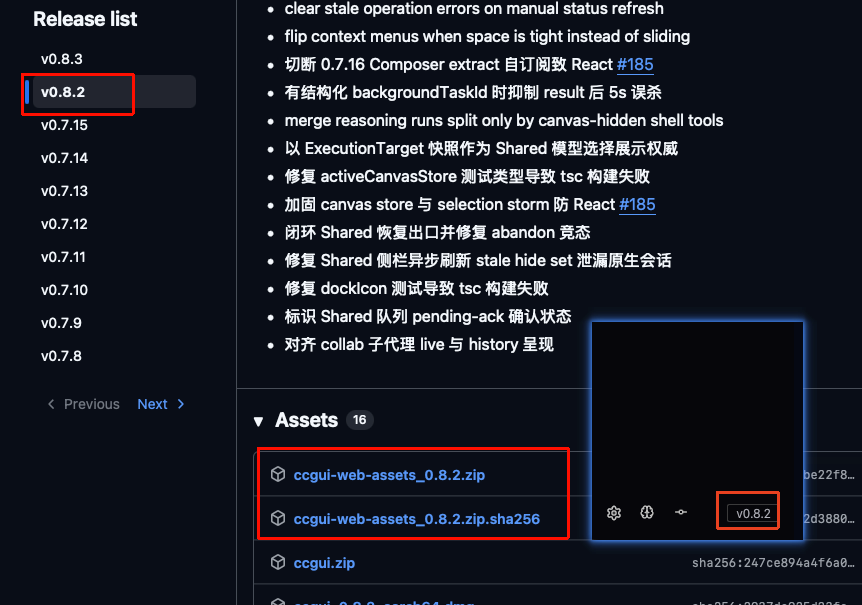
网页版安装(可选)
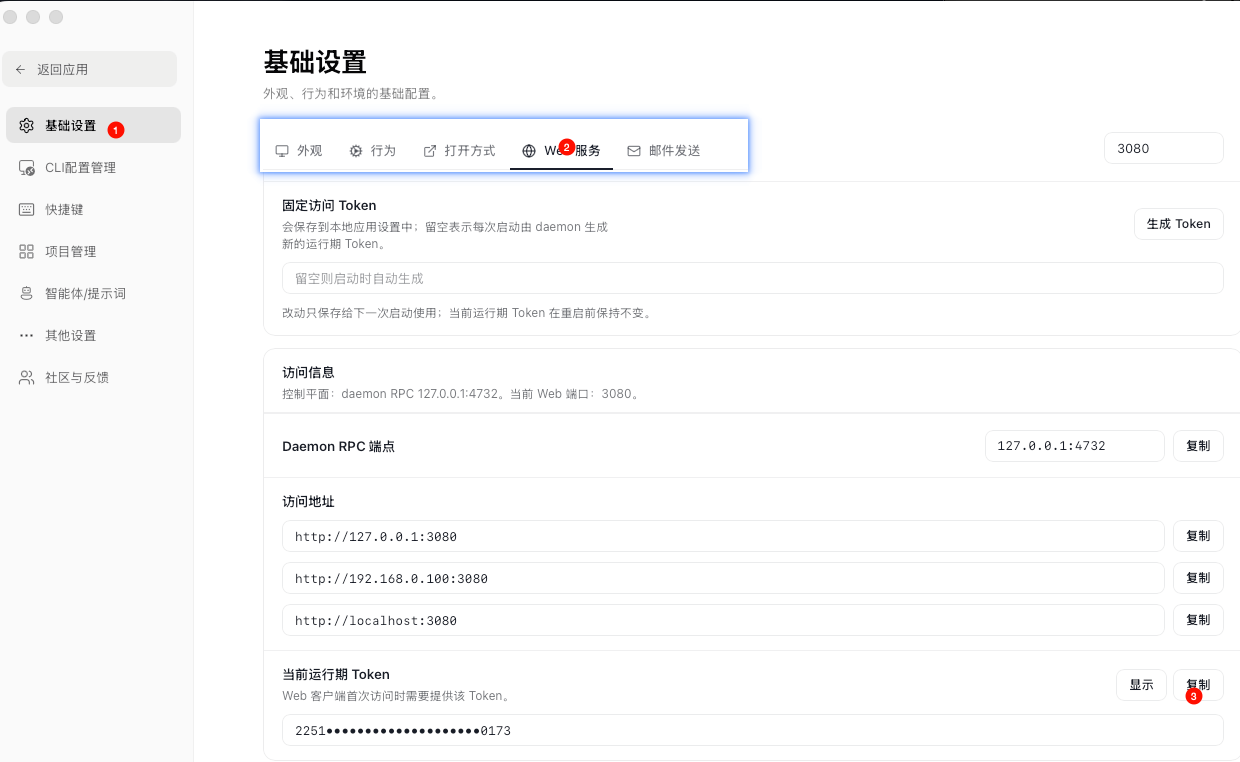
选择安装包
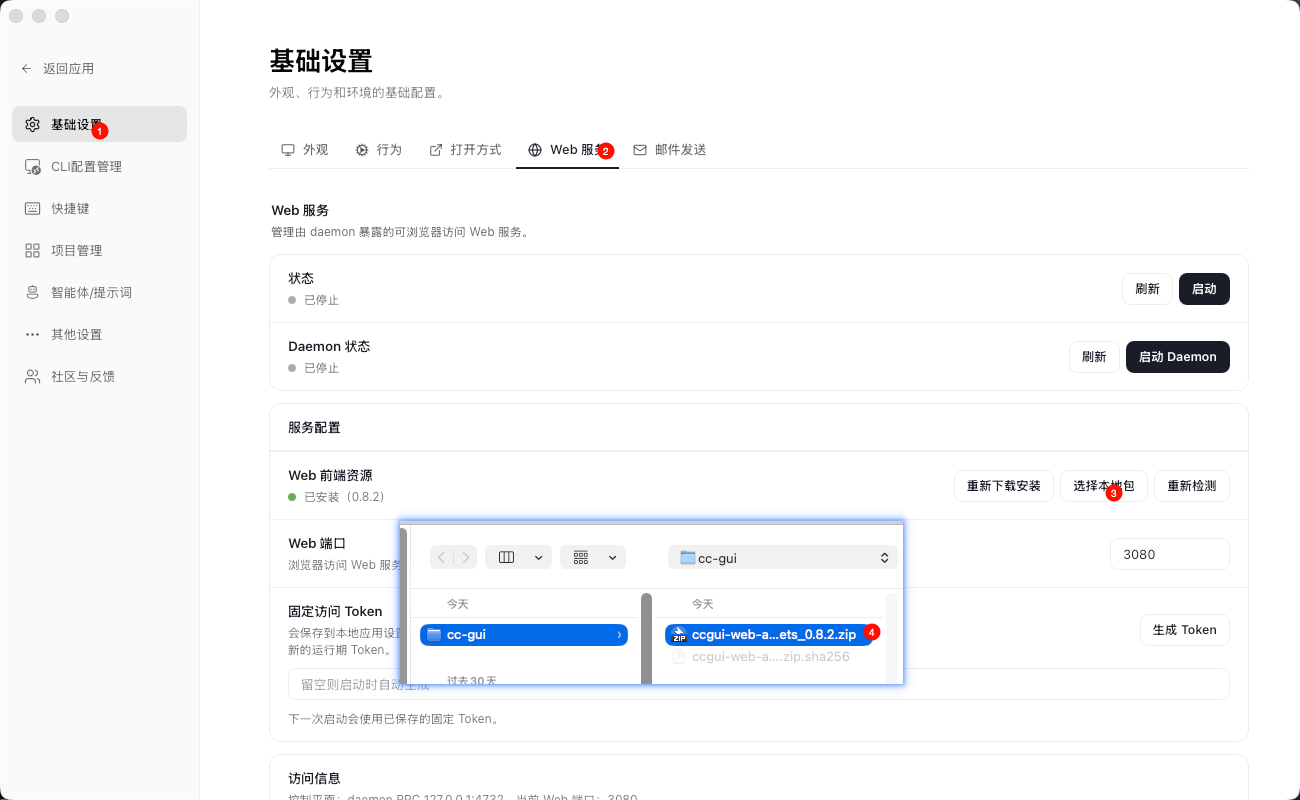
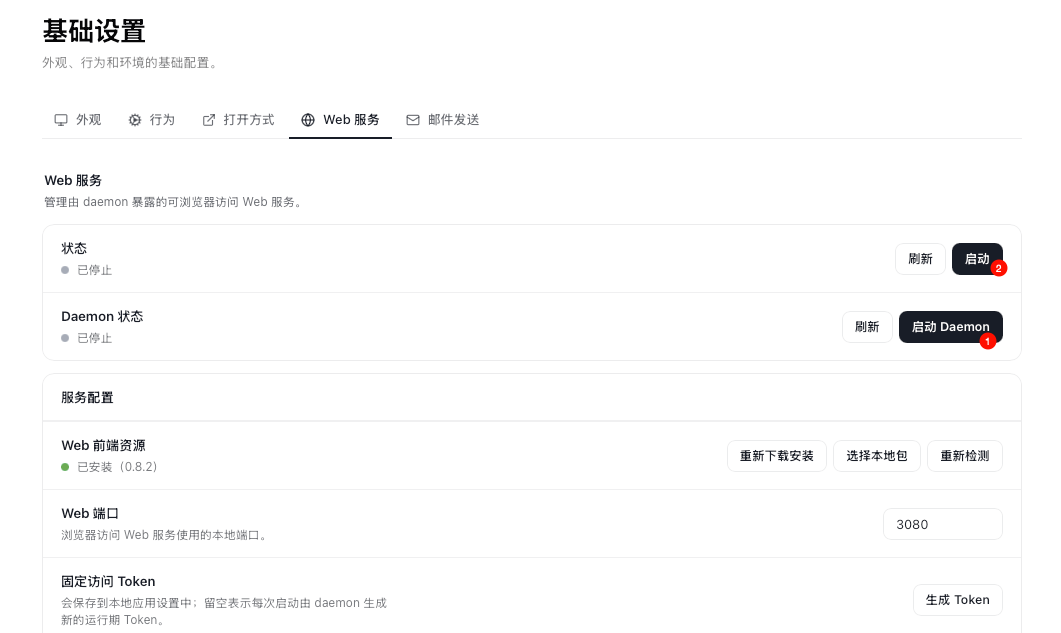
启动服务 启动守护进程,前端进程
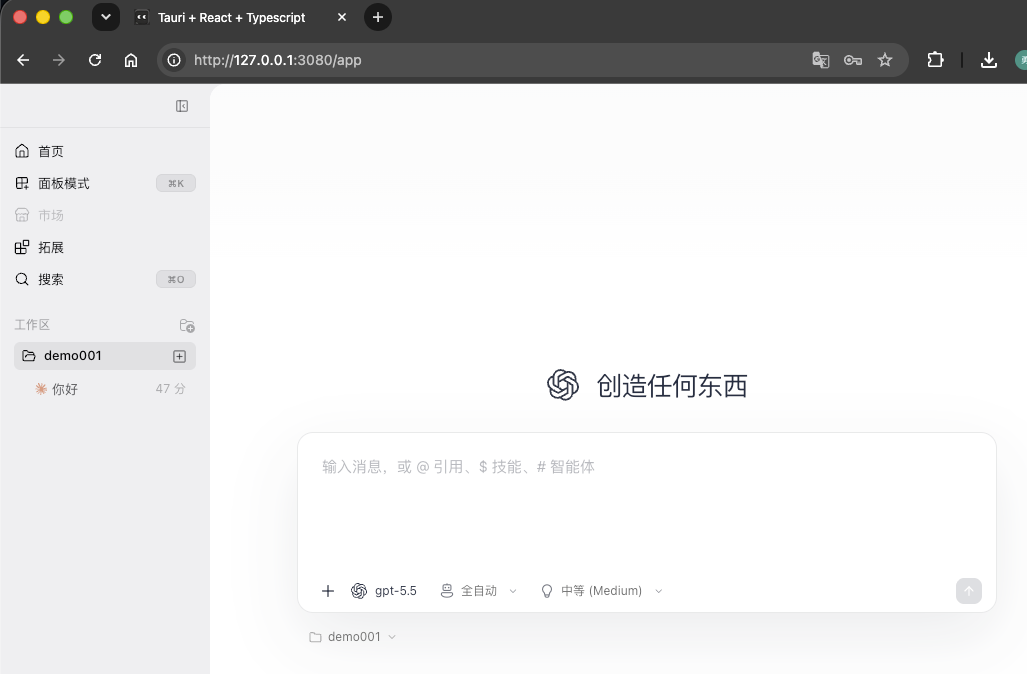
访问前端
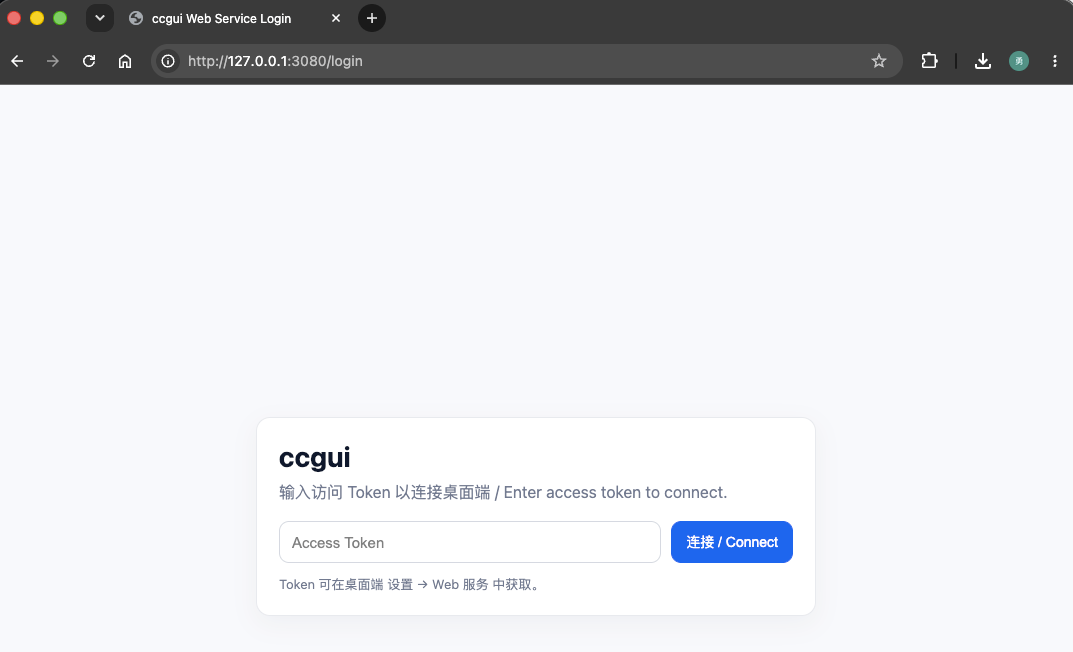
复制token
验证 访问成功,可以网页版远程开发
技能仓库
常用仓库
| 技能仓库 | ||
|---|---|---|
| claw官方 | 腾讯skils | 技能仓库1 |
| cursorpool | ||
推荐使用
安装命令
shell
# 安装开发大佬同款
npx skills@latest add mattpocock/skills
# 安装原始人
npx skills@latest add JuliusBrussee/skillsskills仓库
- DietrichGebert/ponytail
复用已有功能
辅助工具
围绕 Claude Code / Codex / OpenCode / OpenClaw 等 CLI 的配置与切换工具,少改手写 JSON/TOML。
cc switch
跨平台桌面端:统一管理多家 AI CLI 的供应商配置,一键切换 API / 中转,带 MCP、Skills 管理与托盘快切。
cc-switch | 直CC-Switch-v3.17.0-Windows.msi
newapi
承载 AI 应用,管理数字资产,连接 未来. 可以汇聚多家api
docker-compose安装
docker-compose.yml
yaml
version: '3.4'

services:
  new-api:
    image: calciumion/new-api:latest
    container_name: new-api
    restart: always
    command: --log-dir /app/logs
    ports:
      - "3000:3000"
    volumes:
      - ./data:/data
      - ./logs:/app/logs
    environment:
      - SQL_DSN=postgresql://root:123456@postgres:5432/new-api # ⚠️ IMPORTANT: Change the password in production!
#      - SQL_DSN=root:123456@tcp(mysql:3306)/new-api  # Point to the mysql service, uncomment if using MySQL
#      - LOG_SQL_DSN=postgresql://root:123456@postgres:5432/new-api-log # OPTIONAL: If you want a separate database for logging, uncomment and set this
#      - LOG_SQL_DSN=clickhouse://default:123456@clickhouse:9000/new_api_logs # OPTIONAL: Use ClickHouse for logs only; also uncomment clickhouse in depends_on and the clickhouse service below
#      - LOG_SQL_CLICKHOUSE_TTL_DAYS=0 # OPTIONAL: ClickHouse log retention days. Unset or 0 disables automatic deletion; set to e.g. 30 to keep 30 days
      - REDIS_CONN_STRING=redis://:123456@redis:6379 # ⚠️ IMPORTANT: Change the password in production!
      - TZ=Asia/Shanghai
      - ERROR_LOG_ENABLED=true # 是否启用错误日志记录 (Whether to enable error log recording)
      - BATCH_UPDATE_ENABLED=true  # 是否启用批量更新 (Whether to enable batch update)
      - NODE_NAME=new-api-node-1  # 节点名称,用于审计日志中标识节点身份;多节点/容器部署时建议设置 (Node name used in audit logs; recommended when running multiple instances or in containers)
    depends_on:
      - redis
      - postgres
    networks:
      - new-api-network
    healthcheck:
      test: ["CMD-SHELL", "wget -q -O - http://localhost:3000/api/status | grep -o '\"success\":\\s*true' || exit 1"]
      interval: 30s
      timeout: 10s
      retries: 3

  redis:
    image: redis:latest
    container_name: redis
    restart: always
    command: ["redis-server", "--requirepass", "123456"]  # ⚠️ IMPORTANT: Change this password in production!
    networks:
      - new-api-network

  postgres:
    image: postgres:15
    container_name: postgres
    restart: always
    environment:
      POSTGRES_USER: root
      POSTGRES_PASSWORD: 123456  # ⚠️ IMPORTANT: Change this password in production!
      POSTGRES_DB: new-api
    volumes:
      - pg_data:/var/lib/postgresql/data
    networks:
      - new-api-network
volumes:
  pg_data:

networks:
  new-api-network:
driver: bridgeskills-manage
技能管理工具
github | 直skills-manage_0.10.0_windows_x64.msi
哪吒
哪吒(Nezha): 三头六臂,并发编程
专为 AI 编程量身打造的轻量级跨平台IDE
多项目工作区, 快速切换多个项目下的 AI 会话 · 实时终端 · 会话自动发现 · 原生 Git 集成 · Git Worktree 支持 · 轻量级代码编辑器 · Skill 管理
大模型中转站
把各家大模型 API 聚成统一接口(常兼容 OpenAI 格式)。用一份 Key / Base URL 切换 Claude、GPT、国产模型等,方便 Cursor、Claude Code 等工具改中转地址。
Cooper-API
BaseUrl
https://cooper-api.com/v1
小米mimo
BaseUrl
| 使用方式 | 协议 | BaseUrl |
|---|---|---|
| 按量付费 | OpenAI协议 | https://api.xiaomimimo.com/v1 |
| 按量付费 | Anthropic协议 | https://api.xiaomimimo.com/anthropic |
| Token Plan | OpenAI协议 | https://token-plan-cn.xiaomimimo.com/v1 |
| Token Plan | Anthropic协议 | https://token-plan-cn.xiaomimimo.com/anthropic |
agnes(免费送)
免费ai模型的代表
商汤(免费送)
智谱
官网
api快连
梯子
穿山甲
| 简介 | 梯子,加速器 |
|---|---|
| 描述 | 懂的都懂,不解释 |
| crx编码 | bjbhjdonbilbebmodfdgclfbeoponikn |
| 资源下载 | 官穿山甲 |
极速机场
12元/年,每月200G 巨实惠
WARNING
注意首次登录注册,可能需要梯子环境,可以借助上面的 穿山甲
邀请链接 https://jsjc.cfd/#/register?code=W1cp1rfO
客户端
蓝奏云:clash小猫咪各个端 密码:i417
| windows | mac | android |
|---|---|---|
| Clash.Verge_2.5.1 | Clash.Verge_2.5.1 | clash使用教程 |
cloudflare零信任
搭建教程
Cloudflare WARP 免费 VPN 复活了!Zero Trust 最新完整设置教程(高速稳定|4K/8K 秒开实测)
客户端下载
官网cloudflare-one-client, 组织名称填写zlhy7蓝奏云-win/mac,密码:
cuut蓝奏云-android 密码:
aect
命令行测试
代表了调用凭证
测试openai-chatApi
- 测试商汤模型
shell
curl -X POST https://token.sensenova.cn/v1/chat/completions \
  -H "Authorization: Bearer {{ApiKey}}" \
  -H "Content-Type: application/json" \
  -d '{
    "model": "sensenova-6.7-flash-lite",
    "messages": [
      {"role": "user", "content": "简单介绍下自己,一句话"}
    ],
    "temperature": 0.7,
    "max_tokens": 256
}'- 返回值
json
{"id":"224fc334-cfba-4304-b49f-6328ffe1901d","created":1786096695,"model":"sensenova-6.7-flash-lite","object":"chat.completion","choices":[{"index":0,"message":{"role":"assistant","reasoning":"Thinking Process:\n\n1. **Analyze the Request:**\n * Task: Introduce myself (the AI).\n * Constraint: Use only one sentence (一句话).\n * Language: Chinese.\n\n2. **Identify Key Information:**\n * Who am I? An AI assistant (large language model).\n * What can I do? Answer questions, help with tasks, chat, etc.\n * Tone: Friendly, concise, helpful.\n\n3. **Drafting Options:**\n * Option 1: 我是一个人工智能助手,可以帮你回答问题。 (A bit plain)\n * Option 2: 我是商汤科技开发的日日新大模型,很高兴为你服务。 (Specific identity, good)\n * Option 3: 我是一个智能 AI 助手,致力于为你提供有用的信息和帮助。 (General)\n * Option 4: 我是由商汤科技开发的日日新融合模态大模型,中文名商量,英文名 SenseNova,很高兴为你服务。 (Too long for \"one sentence\" constraint if interpreted strictly, but technically one sentence. However, the user asked for a \"simple introduction\" (简单介绍).)"},"finish_reason":"length"}],"usage":{"prompt_tokens":15,"completion_tokens":256,"total_tokens":271,"prompt_tokens_details":{"cached_tokens":0,"audio_tokens":0}},"request_id":"224fc334-cfba-4304-b49f-6328ffe1901d"}测试openai-responseApi
- 测试千问模型
shell
curl -X POST https://dashscope.aliyuncs.com/compatible-mode/v1/responses \
  -H "Authorization: Bearer {{ApiKey}}" \
  -H "Content-Type: application/json" \
  -d '{
    "model": "qwen3.8-max",
    "input": "简单介绍你自己,一句话",
    "reasoning_effort": "high",
    "max_output_tokens": 256
}'- 返回值
json
{"background":false,"completed_at":1786096264,"created_at":1786096262,"frequency_penalty":0.0,"id":"resp_8e37b84e-78ba-94f1-8cbf-8a118ea633ef","max_output_tokens":256,"metadata":{},"model":"qwen3.8-max","object":"response","output":[{"id":"msg_021ccde4-7a0a-44ec-ae7d-f1676cf57a3e","summary":[{"text":"用户要求用一句话简单介绍我自己。需要简洁、自然,体现核心身份和能力,不提及版本号,语气亲切。","type":"summary_text"}],"type":"reasoning"},{"content":[{"annotations":[],"text":"我是通义千问,由阿里巴巴通义实验室研发的大语言模型,擅长回答问题、创作文字、写代码和逻辑推理,希望能成为你得力的 AI 伙伴。","type":"output_text"}],"id":"msg_fbb0cf9f-d194-4c9b-9257-3a85260e8a26","role":"assistant","status":"completed","type":"message"}],"parallel_tool_calls":true,"presence_penalty":0.0,"service_tier":"default","status":"completed","store":true,"temperature":1.0,"tool_choice":"auto","tools":[],"top_logprobs":0,"top_p":1.0,"usage":{"input_tokens":97,"input_tokens_details":{"cached_tokens":0},"output_tokens":65,"output_tokens_details":{"reasoning_tokens":24},"total_tokens":162,"x_details":[{"input_tokens":97,"output_tokens":65,"output_tokens_details":{"reasoning_tokens":24},"prompt_tokens_details":{"cached_tokens":0},"total_tokens":162,"x_billing_type":"response_api"}]}}测试openai-anthropicApi
- 测试千问模型
shell
curl -X POST https://dashscope.aliyuncs.com/apps/anthropic/v1/messages \
  -H "x-api-key: {{ApiKey}}" \
  -H "anthropic-version: 2023-06-01" \
  -H "Content-Type: application/json" \
  -d '{
    "model": "qwen3.8-max",
    "max_tokens": 256,
    "messages": [
      {"role":"user","content":"简单介绍自己,一句话"}
    ]
}'- 返回值
json
{"content":[{"signature":"","thinking":"用户要求用一句话简单介绍自己。需要简洁回应,突出核心身份和能力。想到可以直接说明我是通义千问,并强调语言理解和有帮助的特性。","type":"thinking"},{"text":"我是通义千问,一个由阿里巴巴通义实验室研发的 AI 助手,擅长回答问题、提供信息和协助思考。","type":"text"}],"id":"msg_28f2fb6d-730e-41c5-8dbe-0862ff063796","model":"qwen3.8-max","role":"assistant","stop_reason":"end_turn","type":"message","usage":{"cache_creation_input_tokens":0,"cache_read_input_tokens":0,"input_tokens":65,"output_tokens":62,"prompt_tokens_details":{"cached_tokens":0}}}